Getting Started with the GEC
Factors to Consider before initiating a GEC
The GEC can only correct actual entries.
- For more information, visit Balance Types.
- Budget changes can be done using a Budget Appropriation Transaction (BAT) or Budget Adjustment (BA).
Has the actual entry/document you'd like to correct been posted?
- If the document has not been posted (the document was finalized and has been through the nightly posting process), a GEC cannot be done to correct the entry.
Has a GEC already been initiated/completed on the entry you'd like to correct?
- If a GEC has already been done on that entry, you will not be able to correct the same original entry. You can still correct the entry that was created by the correcting GEC.
Where on ZotPortal is the GEC e-Document?
Log in to ZotPortal and navigate to the Finance/KFS Tab.

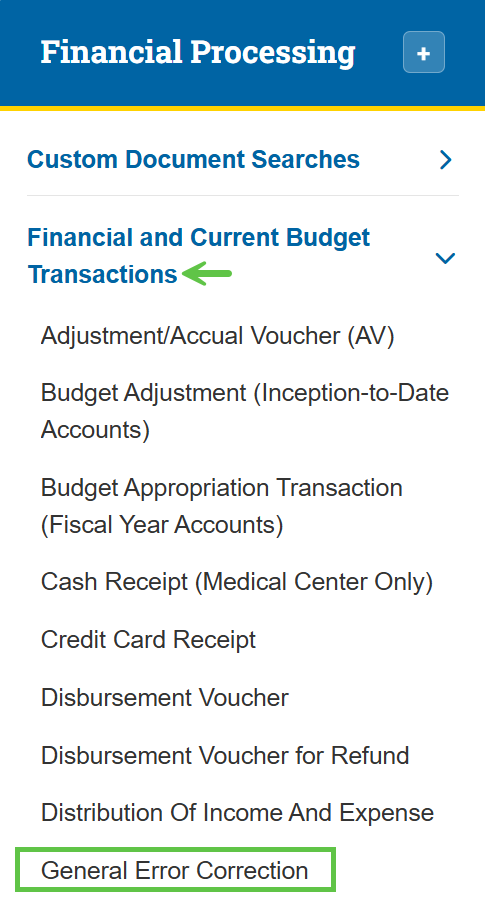
To access the General Error Correction (GEC) eDoc, navigate to the KFS Financial Processing section and expand the Financial and Current Budget Transactions menu, and select General Error Correction.
Tip: For step-by-step instructions with screenshots on how to access KFS from the KFS homepage and use the Jump To box (Ctrl+K / Cmd+K) for quick navigation, see the KFS Access Guide.
If you need help logging into the OIT Software VPN, or are unsure about your KFS access, see Accessing the Kuali Financial System. This page also helps you identify your Department Security Administrator (DSA), who can assist with access issues.
What KSAMS Role Access is Required for the GEC?
The main Kuali Security Access Management System (KSAMS) role associated with GEC is:
- Role 54 User or Basic Financial User C&G
A DSA can grant you access in KSAMS.